

Overview
Condense supports integration with both public GitLab (gitlab.com) and private/self-hosted GitLab instances. This document describes how to configure Condense to work with a private GitLab deployment, using OAuth 2.0 authentication for secure repository and branch access. Private GitLab integration enables:- Repository access for Condense applications.
- Branch-level validation before pipelines run.
- Cloning source code into Condense build environments.
- Publishing and restoring applications backed by private Git repositories.
Prerequisites
To integrate a private GitLab instance with Condense:- Running GitLab instance: GitLab CE/EE deployed on-premise or in cloud (e.g., Docker-based EC2 deployment).
- Domain name: e.g.,
gitlab.company.com, pointing to the GitLab server. - TLS/SSL certificate: HTTPS endpoint required (Let’s Encrypt, enterprise CA, or self-signed).
- Admin account in GitLab.
- OAuth Application configured in GitLab, providing:
- Client ID
- Client Secret
- Redirect URI (Condense callback URL)
- Network access: Condense backend services must be able to reach your GitLab endpoint over HTTPS.
Roles and Scopes in Private GitLab
Roles
- Guest → Limited visibility; cannot pull or push repository code.
- Reporter → Can pull repository content; cannot push.
- Developer → Can push commits, create branches (subject to branch protections).
- Maintainer → Full project control, including branch and merge request management.
- Owner → Administrative control at the group level.
Scopes
- read_api → Allows Condense to query projects, groups, and metadata.
- read_repository → Allows Condense to fetch repository contents.
- write_repository (optional) → Allows Condense to push commits or update commit statuses if the user role permits it.
Effective Access
A user’s access = Role ∩ Scope ∩ Branch Protections. Examples:- Guest + read_repository → cannot access repo contents (role blocks it).
- Reporter + read_repository → can fetch repository code.
- Developer + read_repository + write_repository → can fetch and push, if branch rules allow.
- Maintainer + all scopes → full repository access, still subject to branch rules.
- Non-member → cannot link repositories, regardless of scopes.
GitLab Configuration
Create OAuth Application in GitLab
- Log in to your private GitLab instance as an administrator.
- Navigate to Admin Area → Applications.
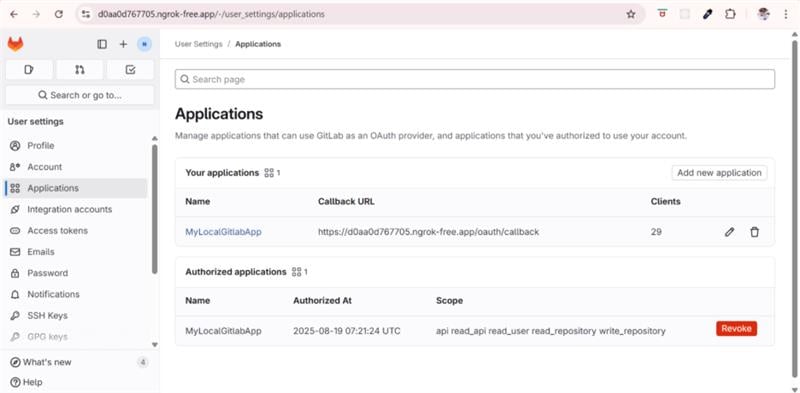
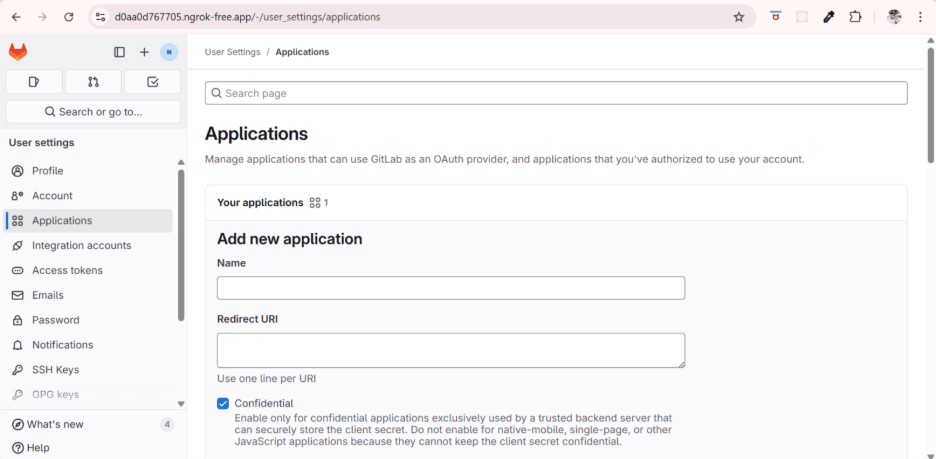
- Select New Application and provide the following:
- Name: Condense Integration
- Redirect URI: https://central-tower-dev.zeliot.in/redirect
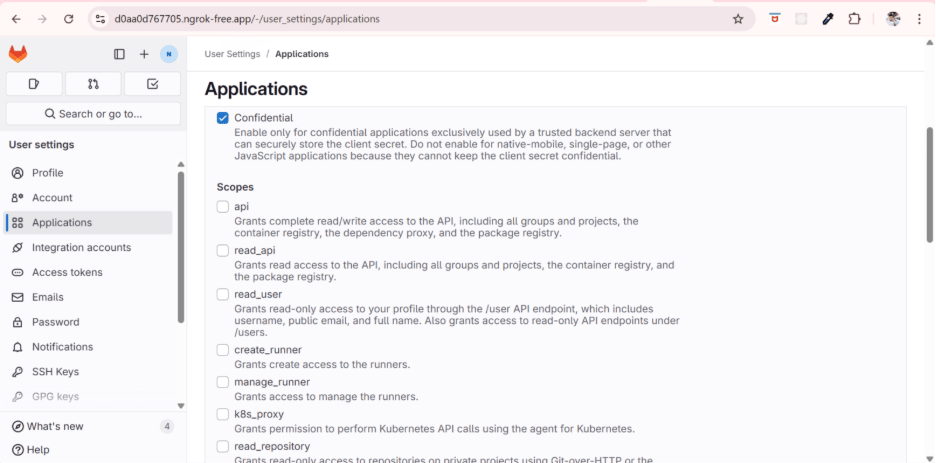
- Scopes: select
api
- Save and note the generated Client ID and Client Secret.
Condense Configuration
Provider Registration (Admin Only)
Private GitLab instances must be registered in Condense by an organization admin.
Configuration is stored in the
vc_provider_config table and can be added via API:
Copy
User Authentication Flow
- User initiates login with GitLab in Condense.
- Condense redirects the request to the private GitLab OAuth endpoint: Copy
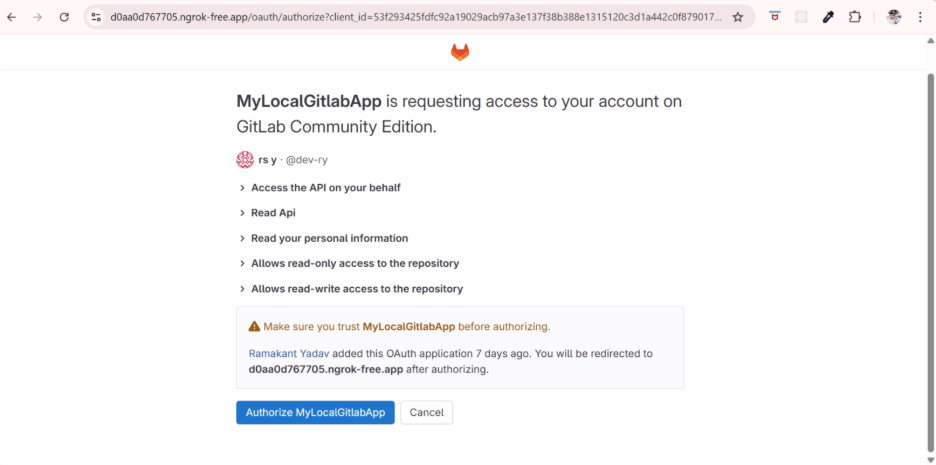
- GitLab issues an authorization code.
- Condense exchanges the authorization code for an access token:
- Condense stores the access and refresh tokens in
vc_auth_details. - Token refresh is handled automatically using Client ID and Client Secret.
Application Lifecycle with Private GitLab
Condense integrates private GitLab repositories across the entire application lifecycle:Configuration Example
A typical provider configuration payload for private GitLab: CopyRestrictions
- Only HTTPS endpoints supported; plain HTTP is not allowed.
- Authentication supported only via OAuth 2.0. SSH keys and basic authentication are not supported.
- Repository and branch visibility is determined entirely by GitLab RBAC. Condense does not override GitLab permissions.
- GitLab API rate limits apply (default: ~600 requests/minute per token).
Controls
- Admin Control: Only admins can register a private GitLab instance in Condense.
- Org-Scoped Configs: Configurations are stored at the organization level.
- Access Enforcement: Users only see repositories and branches they are authorized for in GitLab.
- Token Lifecycle: Tokens are encrypted, refreshed automatically, and revocable by admins.
- Audit Logging: All VCS interactions (auth, repo fetch, branch validation, clone) are logged.
Best Practices
- Minimize scope selection — default to read-only unless write access is justified.
- Use Protected Branches to enforce push/merge policies, regardless of Condense integration.
- Educate users: scopes = APIs allowed; roles = actual repository permissions.
- Audit Condense-linked repositories quarterly for compliance.
- Keep Condense as a consumer of repository data; governance remains in GitLab.